Book an Appointment
Call San Diego Computer Repair Service at 
619-393-8620
                   

(619) 393-8620

*


San Diego Computer Repair Service has been providing the best mobile computer repair in San Diego, CA and the greater San Diego Metro Area since 1999. The term "mobile computer repair" means we come to you to resolve all your computer problems.

We repair laptops, desktops, PCs and Apple computers. One of our highly qualified staff will come to you, often the same day, to take care of all your repair needs.

Why not use the #1 rated company for computer repair in San Diego, CA?

Computer Repair 4.9 / 5 stars from 286 reviews
Why use a computer tech when you can have a San Diego based Computer Engineer? Mon-Sun 8:00am - 8:00pm

Call us at (619) 393-8620

Text us at (619) 393-8620

Email us your questions

Book an Appointment

"William has been a godsend to me. I am not a computer geek and he has made my life much less complicated with his knowledge and help. "
San Diego Computer Repair Service 5 / 5 stars
"Matt was prompt, friendly, knowledgeable and informative. I will recommend to my friend!"
San Diego Computer Repair Service 5 / 5 stars
"I needed to transfer old outlook emails and my favorites to a new computer. Taylor was able to transfer and set it up perfectly. Stress levels now at normal once again, thanks for the great service."
San Diego Computer Repair Service 5 / 5 stars
"Ben was amazing and insightful. We cannot thank you enough."
San Diego Computer Repair Service 5 / 5 stars
"Polite, professional, well done. I received excellent solutions to my computer problems. He helped me understand what I needed to do in the future, and setup an online backup for my computer."
San Diego Computer Repair Service 5 / 5 stars

Who is San Diego Computer Repair Service?

San Diego Computer Repair Service is owned by Matt Karls, an Electrical Engineer and a Computer Systems Engineer. We are a team of computer professionals focused on service and quality, all our work is guaranteed.

If you have any computer, technology or IT problem in San Diego, CA we can fix it. We have been performing computer repair in San Diego full time since 1999. Feel free to give us a call or text us at (619) 393-8620.

San Diego Computer Repair Service's Computer Engineer

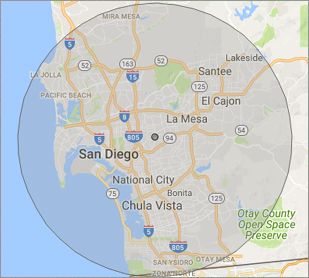
What is your Service Area for on-site Computer Repair?

We have serviced San Diego and the entire San Diego metro area for over a decade.

Our primary on-site mobile service areas include the greater San Diego metropolitan area, the Phoenix metro area, the Tucson metro area and the Las Vegas metro area.

We provide remote and mobile computer repair in San Diego, Chula Vista, Coronado, El Cajon, Imperial Beach, La Mesa, Lemon Grove,
National City and Santee.

Our on-site Computer Service Area

What should someone expect that hires you for Computer Service?

Our mission is to fully resolve your computer problems quickly and affordably. If you want a Computer Engineer that can fix all of your computer problems instead of a computer tech, a computer geek, a technician or a computer guy that can only fix some of your problems; call us at (619) 393-8620.  

What types of Computer Services do you perform?

We service businesses and business clients in their homes, including:
 
  • Diagnose / repair hardware or software problems
  • Spyware, malware, trojan and virus removal
  • Setup wireless and small business networks
  • Laptop repair, PC repair and Apple repair
  • Hard drive data recovery

San Diego Computer Repair Service Contact Information

San Diego Computer Repair Service
(619) 393-8620

San Diego Computer Repair Service is a Karls Technology company

* *
*
*
*
  *
* *


*
*
* * * * * * * * * * * * * * *
4.9 / 5 stars from 286 reviews

"Jason was the epitome of professionalism. He was so knowledgeable as well as thorough. I would use him anytime. I am extremely happy and thank you very much."

San Diego Computer Repair Service 5 / 5 stars

"The computer technician, Taylor, was patient, thorough and knowledgeable. He answered our concerns well and offered advice when asked. We were very happy with the results."

San Diego Computer Repair Service 5 / 5 stars

"Excellent help; friendly, personable, knowledgeable. Perfect!"

San Diego Computer Repair Service 5 / 5 stars

"Matt was excellent! Not only did he fix my printer issue, he took the time to educate me on several other helpful issues. Since I'm not a techie, he didn't talk down to me, rather, explained the issue in terms I could understand. I will definitely use again! Have a computer issue? These are the folks to call. "

San Diego Computer Repair Service 5 / 5 stars
Best Antivirus Software of 2026: The Ultimate Guide to Cybersecurity Brands

In 2026, the digital threat landscape has shifted. We are no longer just fighting simple viruses; we are defending against AI-generated phishing, sophisticated ransomware-as-a-service, and complex identity theft. Choosing the right antivirus brand is no longer optional—it is the foundation of your digital life. At Karls Technology, we’ve analyzed the top-performing security suites of the […] The post Best Antivirus Software of 2026: The Ultimate Guide to Cybersecurity Brands appeared first on Computer Repair Blog.

Windows OS is Unresponsive – Fast Startup

Turning off this feature could be the quickest and easiest approach to solve this problem. The useful function known as “Fast Startup” maintains your Windows OS in the hibernation mode so that it does not need to be completely relaunched after it has been shut down. This results in a significantly quicker reboot. Even though […] The post Windows OS is Unresponsive – Fast Startup appeared first on Computer Repair Blog.

Free Up Storage Easily

Free up some space on your hard drive. On Windows, you can utilize Storage Sense, while Mac users can access helpful tools within the Storage application. Windows also includes a tool called Disk Defragmenter for cleaning up disk fragmentation. Data that you can’t bear to lose should be moved to an external drive or cloud […] The post Free Up Storage Easily appeared first on Computer Repair Blog.

Webcams Can Be Hacked

The webcam can be compromised if an unauthorised program, application, or device is used that contains a vulnerability that hackers can exploit. Malware can inadvertently be acquired by users when they interact with phishing links, download malicious attachments, or visit compromised websites. This software could be used by an intruder to secretly record from a […] The post Webcams Can Be Hacked appeared first on Computer Repair Blog.

Guide to Antivirus Brands in 2024

Karls Technology’s Comprehensive Guide to the Best Antivirus Brands in 2024 In today’s digital age, cybersecurity is more critical than ever. With the increasing number of cyber threats, from malware and phishing attacks to ransomware and identity theft, having reliable antivirus software is a necessity. The market is saturated with numerous antivirus brands, each offering […] The post Guide to Antivirus Brands in 2024 appeared first on Computer Repair Blog.

Windows Search Tool

Windows search is the most efficient method to utilize when looking for certain files, documents, or applications using a keyword. As a short cut, it gets the job done well. Windows 11 systems use a “magnifying glass” symbol for Windows Search on the taskbar, while Windows 10 computers feature a search box. If you type […] The post Windows Search Tool appeared first on Computer Repair Blog.

Turn off Android Alerts to Help Battery

Faster smartphones are on the horizon, and with each software upgrade comes a slew of new functions designed to streamline your daily routine. Unfortunately, this technology may potentially shorten the lifespan of your device’s battery. If you have too many notifications set up on your Android, its battery life may suffer. To enable alerts on […] The post Turn off Android Alerts to Help Battery appeared first on Computer Repair Blog.

‘What is my IP address’ on Mac

Internet Protocol (IP) addresses are needed for computers including desktops, portable devices, and hosts to communicate with one another via the network. It is important to know where to find the IP address, if it’s needed for any future issues. If you’re needing to find your IP address on your Mac, look no further. There […] The post ‘What is my IP address’ on Mac appeared first on Computer Repair Blog.

Change Windows Update Times

You can alter the the times your computer is available to update. And it’s easy to do so. Schedule Windows Update to begin and end at certain times. The configuration tool may be launched by searching the Windows Update settings. The parameters may be updated to alter the active times. Select new working hours here. […] The post Change Windows Update Times appeared first on Computer Repair Blog.

Lockdown Mode Now Available

Lockdown Mode is a new security option available to iPhone and iPad owners in iOS 16 and iPadOS 16. Its purpose is to safeguard users from attacks launched by privately-held firms developing government-sponsored spyware. In July, when it was still in beta, we let our readers know about it. You can now obtain it. Users […] The post Lockdown Mode Now Available appeared first on Computer Repair Blog.