Book an Appointment
Call San Diego Computer Repair Service at 
619-393-8620
                   

(619) 393-8620

*


San Diego Computer Repair Service has been providing the best mobile computer repair in San Diego, CA and the greater San Diego Metro Area since 1999. The term "mobile computer repair" means we come to you to resolve all your computer problems.

We repair laptops, desktops, PCs and Apple computers. One of our highly qualified staff will come to you, often the same day, to take care of all your repair needs.

Why not use the #1 rated company for computer repair in San Diego, CA?

Computer Repair 4.9 / 5 stars from 286 reviews
Why use a computer tech when you can have a San Diego based Computer Engineer? Mon-Sun 8:00am - 8:00pm

Call us at (619) 393-8620

Text us at (619) 393-8620

Email us your questions

Book an Appointment

"William has been a godsend to me. I am not a computer geek and he has made my life much less complicated with his knowledge and help. "
San Diego Computer Repair Service 5 / 5 stars
"Matt was prompt, friendly, knowledgeable and informative. I will recommend to my friend!"
San Diego Computer Repair Service 5 / 5 stars
"I needed to transfer old outlook emails and my favorites to a new computer. Taylor was able to transfer and set it up perfectly. Stress levels now at normal once again, thanks for the great service."
San Diego Computer Repair Service 5 / 5 stars
"Ben was amazing and insightful. We cannot thank you enough."
San Diego Computer Repair Service 5 / 5 stars
"Polite, professional, well done. I received excellent solutions to my computer problems. He helped me understand what I needed to do in the future, and setup an online backup for my computer."
San Diego Computer Repair Service 5 / 5 stars

Who is San Diego Computer Repair Service?

San Diego Computer Repair Service is owned by Matt Karls, an Electrical Engineer and a Computer Systems Engineer. We are a team of computer professionals focused on service and quality, all our work is guaranteed.

If you have any computer, technology or IT problem in San Diego, CA we can fix it. We have been performing computer repair in San Diego full time since 1999. Feel free to give us a call or text us at (619) 393-8620.

San Diego Computer Repair Service's Computer Engineer

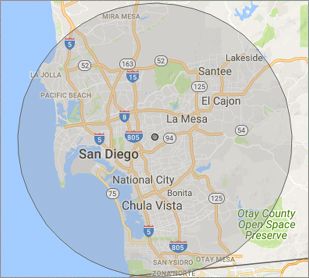
What is your Service Area for on-site Computer Repair?

We have serviced San Diego and the entire San Diego metro area for over a decade.

Our primary on-site mobile service areas include the greater San Diego metropolitan area, the Phoenix metro area, the Tucson metro area and the Las Vegas metro area.

We provide remote and mobile computer repair in San Diego, Chula Vista, Coronado, El Cajon, Imperial Beach, La Mesa, Lemon Grove,
National City and Santee.

Our on-site Computer Service Area

What should someone expect that hires you for Computer Service?

Our mission is to fully resolve your computer problems quickly and affordably. If you want a Computer Engineer that can fix all of your computer problems instead of a computer tech, a computer geek, a technician or a computer guy that can only fix some of your problems; call us at (619) 393-8620.  

What types of Computer Services do you perform?

We service businesses and business clients in their homes, including:
 
  • Diagnose / repair hardware or software problems
  • Spyware, malware, trojan and virus removal
  • Setup wireless and small business networks
  • Laptop repair, PC repair and Apple repair
  • Hard drive data recovery

San Diego Computer Repair Service Contact Information

San Diego Computer Repair Service
(619) 393-8620

San Diego Computer Repair Service is a Karls Technology company

* *
*
*
*
  *
* *


*
*
* * * * * * * * * * * * * * *
4.9 / 5 stars from 286 reviews

"Jason was the epitome of professionalism. He was so knowledgeable as well as thorough. I would use him anytime. I am extremely happy and thank you very much."

San Diego Computer Repair Service 5 / 5 stars

"The computer technician, Taylor, was patient, thorough and knowledgeable. He answered our concerns well and offered advice when asked. We were very happy with the results."

San Diego Computer Repair Service 5 / 5 stars

"Excellent help; friendly, personable, knowledgeable. Perfect!"

San Diego Computer Repair Service 5 / 5 stars

"Matt was excellent! Not only did he fix my printer issue, he took the time to educate me on several other helpful issues. Since I'm not a techie, he didn't talk down to me, rather, explained the issue in terms I could understand. I will definitely use again! Have a computer issue? These are the folks to call. "

San Diego Computer Repair Service 5 / 5 stars
Best Antivirus Software of 2026: The Ultimate Guide to Cybersecurity Brands

In 2026, the digital threat landscape has shifted. We are no longer just fighting simple viruses; we are defending against AI-generated phishing, sophisticated ransomware-as-a-service, and complex identity theft. Choosing the right antivirus brand is no longer optional—it is the foundation of your digital life. At Karls Technology, we’ve analyzed the top-performing security suites of the […] The post Best Antivirus Software of 2026: The Ultimate Guide to Cybersecurity Brands appeared first on Computer Repair Blog.

Protect Your Personal Information – Change Password

If your password has been compromised as a result of a security breach, you should change it promptly. Do not use the same password on multiple websites. Hackers and crooks are well-versed in all trade secrets. You can reduce the amount of damage done by using a different, strong password for each protected site you […] The post Protect Your Personal Information – Change Password appeared first on Computer Repair Blog.

Temporary Files on Windows OS

A temporary file is a file that is made to hold data while another file is being made or updated. The temporary file (also known as a temp file) is deleted after the program has been closed. Temporary files can be used for a wide variety of purposes, from storing and transferring data to handling […] The post Temporary Files on Windows OS appeared first on Computer Repair Blog.

Windows OS Hibernation

A feature of the Windows operating system that can be found in both desktop computers and laptops is called hibernation. It is possible to program it to take place automatically if a battery alert goes out. Its primary function, with regard to desktop computers, is to act as an all-around method for conserving energy. Because […] The post Windows OS Hibernation appeared first on Computer Repair Blog.

Browser Extensions – Safe or Not?

When little software programs called browser extensions are installed on a web browser, it can be enhanced with new features and functions. Those who work online benefit greatly from these extensions. Similar to how JavaScript may utilize a web page’s APIs (Application Program Interface), a browser extension can do the same.These are also called “plug-ins”. […] The post Browser Extensions – Safe or Not? appeared first on Computer Repair Blog.

Using Multiple Monitors

If you’re using multiple monitors, you may simply drag a window over to the side by pressing the Windows key and the appropriate arrow keys. Windows + P instantly enables a second monitor, while Shift + Windows Key + Arrows transfers the window to the next available monitor. Mission Control allows Mac users to view […] The post Using Multiple Monitors appeared first on Computer Repair Blog.

New Processor Compatibilities on Windows 11

The rigorous system requirements of Windows 11 and Microsoft’s insistence on using only the most recent hardware earned widespread criticism even before the operating system was made available to the public. According to Windows Latest, many PCs will not be able to acquire an official transition to Windows 11 from previous Windows operating systems. Windows […] The post New Processor Compatibilities on Windows 11 appeared first on Computer Repair Blog.

Turn off Android Alerts to Help Battery

Faster smartphones are on the horizon, and with each software upgrade comes a slew of new functions designed to streamline your daily routine. Unfortunately, this technology may potentially shorten the lifespan of your device’s battery. If you have too many notifications set up on your Android, its battery life may suffer. To enable alerts on […] The post Turn off Android Alerts to Help Battery appeared first on Computer Repair Blog.

Upcoming VPN Feature on Windows 11

As of Windows 11, a message may soon appear in the system tray when you are connected to a VPN, allowing you to confirm that you are connected if you prefer anonymous browsing. Virtual Private Networks (VPNs) make it possible to surf the Internet without being traced. Unfortunately for companies, this location-insensitive technology is useless […] The post Upcoming VPN Feature on Windows 11 appeared first on Computer Repair Blog.

Stop Applications From Starting Automatically

After being installed, certain programs will operate in the background on occasion. Even while it works for a few apps, its overall performance is poor. System performance drops when a large number of apps are set to launch automatically. For optimal speed, unnecessary programs during startup should be disabled. The good news is that Windows […] The post Stop Applications From Starting Automatically appeared first on Computer Repair Blog.