Book an Appointment
Call San Diego Computer Repair Service at 
619-393-8620
                   

(619) 393-8620

*


San Diego Computer Repair Service has been providing the best mobile computer repair in San Diego, CA and the greater San Diego Metro Area since 1999. The term "mobile computer repair" means we come to you to resolve all your computer problems.

We repair laptops, desktops, PCs and Apple computers. One of our highly qualified staff will come to you, often the same day, to take care of all your repair needs.

Why not use the #1 rated company for computer repair in San Diego, CA?

Computer Repair 4.9 / 5 stars from 286 reviews
Why use a computer tech when you can have a San Diego based Computer Engineer? Mon-Sun 8:00am - 8:00pm

Call us at (619) 393-8620

Text us at (619) 393-8620

Email us your questions

Book an Appointment

"William has been a godsend to me. I am not a computer geek and he has made my life much less complicated with his knowledge and help. "
San Diego Computer Repair Service 5 / 5 stars
"Matt was prompt, friendly, knowledgeable and informative. I will recommend to my friend!"
San Diego Computer Repair Service 5 / 5 stars
"I needed to transfer old outlook emails and my favorites to a new computer. Taylor was able to transfer and set it up perfectly. Stress levels now at normal once again, thanks for the great service."
San Diego Computer Repair Service 5 / 5 stars
"Ben was amazing and insightful. We cannot thank you enough."
San Diego Computer Repair Service 5 / 5 stars
"Polite, professional, well done. I received excellent solutions to my computer problems. He helped me understand what I needed to do in the future, and setup an online backup for my computer."
San Diego Computer Repair Service 5 / 5 stars

Who is San Diego Computer Repair Service?

San Diego Computer Repair Service is owned by Matt Karls, an Electrical Engineer and a Computer Systems Engineer. We are a team of computer professionals focused on service and quality, all our work is guaranteed.

If you have any computer, technology or IT problem in San Diego, CA we can fix it. We have been performing computer repair in San Diego full time since 1999. Feel free to give us a call or text us at (619) 393-8620.

San Diego Computer Repair Service's Computer Engineer

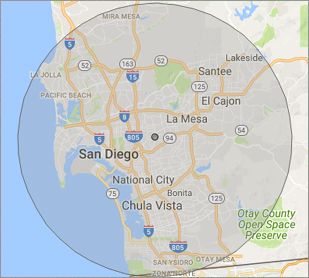
What is your Service Area for on-site Computer Repair?

We have serviced San Diego and the entire San Diego metro area for over a decade.

Our primary on-site mobile service areas include the greater San Diego metropolitan area, the Phoenix metro area, the Tucson metro area and the Las Vegas metro area.

We provide remote and mobile computer repair in San Diego, Chula Vista, Coronado, El Cajon, Imperial Beach, La Mesa, Lemon Grove,
National City and Santee.

Our on-site Computer Service Area

What should someone expect that hires you for Computer Service?

Our mission is to fully resolve your computer problems quickly and affordably. If you want a Computer Engineer that can fix all of your computer problems instead of a computer tech, a computer geek, a technician or a computer guy that can only fix some of your problems; call us at (619) 393-8620.  

What types of Computer Services do you perform?

We service businesses and business clients in their homes, including:
 
  • Diagnose / repair hardware or software problems
  • Spyware, malware, trojan and virus removal
  • Setup wireless and small business networks
  • Laptop repair, PC repair and Apple repair
  • Hard drive data recovery

San Diego Computer Repair Service Contact Information

San Diego Computer Repair Service
(619) 393-8620

San Diego Computer Repair Service is a Karls Technology company

* *
*
*
*
  *
* *


*
*
* * * * * * * * * * * * * * *
4.9 / 5 stars from 286 reviews

"Jason was the epitome of professionalism. He was so knowledgeable as well as thorough. I would use him anytime. I am extremely happy and thank you very much."

San Diego Computer Repair Service 5 / 5 stars

"The computer technician, Taylor, was patient, thorough and knowledgeable. He answered our concerns well and offered advice when asked. We were very happy with the results."

San Diego Computer Repair Service 5 / 5 stars

"Excellent help; friendly, personable, knowledgeable. Perfect!"

San Diego Computer Repair Service 5 / 5 stars

"Matt was excellent! Not only did he fix my printer issue, he took the time to educate me on several other helpful issues. Since I'm not a techie, he didn't talk down to me, rather, explained the issue in terms I could understand. I will definitely use again! Have a computer issue? These are the folks to call. "

San Diego Computer Repair Service 5 / 5 stars
Best Antivirus Software of 2026: The Ultimate Guide to Cybersecurity Brands

In 2026, the digital threat landscape has shifted. We are no longer just fighting simple viruses; we are defending against AI-generated phishing, sophisticated ransomware-as-a-service, and complex identity theft. Choosing the right antivirus brand is no longer optional—it is the foundation of your digital life. At Karls Technology, we’ve analyzed the top-performing security suites of the […] The post Best Antivirus Software of 2026: The Ultimate Guide to Cybersecurity Brands appeared first on Computer Repair Blog.

Add Your Own Keyboard Shortcut

Simple tasks like accessing a web page may be accomplished with a single click of a button rather than by inputting a URL, browsing through directories, or selecting individual icons. Keyboard shortcuts, or “hotkeys,” are combinations of keys that, when pushed simultaneously, perform a predetermined action. To create a shortcut, locate the file or directory […] The post Add Your Own Keyboard Shortcut appeared first on Computer Repair Blog.

Gaming Issues on Windows 11

Several players have complained that their games have slowed down since installing the latest Windows 11 OS upgrade. Both stuttering and other glitches cause them difficulty. It’s possible that this speed drop is the result of some apps and games mistakenly activating GPU performance debugging tools. Microsoft has yet to fix this issue in the […] The post Gaming Issues on Windows 11 appeared first on Computer Repair Blog.

Free Up Storage Easily

Free up some space on your hard drive. On Windows, you can utilize Storage Sense, while Mac users can access helpful tools within the Storage application. Windows also includes a tool called Disk Defragmenter for cleaning up disk fragmentation. Data that you can’t bear to lose should be moved to an external drive or cloud […] The post Free Up Storage Easily appeared first on Computer Repair Blog.

Guide to Antivirus Brands in 2024

Karls Technology’s Comprehensive Guide to the Best Antivirus Brands in 2024 In today’s digital age, cybersecurity is more critical than ever. With the increasing number of cyber threats, from malware and phishing attacks to ransomware and identity theft, having reliable antivirus software is a necessity. The market is saturated with numerous antivirus brands, each offering […] The post Guide to Antivirus Brands in 2024 appeared first on Computer Repair Blog.

Southwest Airlines changes $8 internet prices

Southwest Airlines has recently announced a change in its in-flight internet pricing model, shifting from an $8 daily internet fee to an $8 per flight segment internet access fee. This decision has sparked conversation and interest from consumers... The post Southwest Airlines changes $8 internet prices appeared first on Computer Repair Blog.

YouTube Is Getting a Facelift

Several updates by YouTube have been released to desktop and mobile video player today, all of which are designed to improve the player’s aesthetics and performance. According to MacRumors, YouTube announced today that their dark theme will be getting an upgrade. Along with that, the video player will be updated with buttons and different colors. […] The post YouTube Is Getting a Facelift appeared first on Computer Repair Blog.

Windows OS is Unresponsive – Fast Startup

Turning off this feature could be the quickest and easiest approach to solve this problem. The useful function known as “Fast Startup” maintains your Windows OS in the hibernation mode so that it does not need to be completely relaunched after it has been shut down. This results in a significantly quicker reboot. Even though […] The post Windows OS is Unresponsive – Fast Startup appeared first on Computer Repair Blog.

Turn off Fluent Design to Increase Performance

Windows 10 has a lot of visual effects, like animations, shadows, and more advanced effects, which are part of the Fluent Design language on Windows 10. The Fluent Design, while creates a more modernized look, could slow down your computer. Thankfully, you can turn these effects off, though, to make Windows 10 feel faster. In […] The post Turn off Fluent Design to Increase Performance appeared first on Computer Repair Blog.

Changing Default Browser on Windows 11

Changing your default browser on Windows 11 is really easy. Click on the Start menu, then go to Settings, then Apps, and finally Default Apps. Simply choose your preferred browser and click “Set default” to make it your default browser. Keep in mind your desired default browser is selected in both the HTTP and HTTPS […] The post Changing Default Browser on Windows 11 appeared first on Computer Repair Blog.