Book an Appointment
Call San Diego Computer Repair Service at 
619-393-8620
                   

(619) 393-8620

*


San Diego Computer Repair Service has been providing the best mobile computer repair in San Diego, CA and the greater San Diego Metro Area since 1999. The term "mobile computer repair" means we come to you to resolve all your computer problems.

We repair laptops, desktops, PCs and Apple computers. One of our highly qualified staff will come to you, often the same day, to take care of all your repair needs.

Why not use the #1 rated company for computer repair in San Diego, CA?

Computer Repair 4.9 / 5 stars from 286 reviews
Why use a computer tech when you can have a San Diego based Computer Engineer? Mon-Sun 8:00am - 8:00pm

Call us at (619) 393-8620

Text us at (619) 393-8620

Email us your questions

Book an Appointment

"William has been a godsend to me. I am not a computer geek and he has made my life much less complicated with his knowledge and help. "
San Diego Computer Repair Service 5 / 5 stars
"Matt was prompt, friendly, knowledgeable and informative. I will recommend to my friend!"
San Diego Computer Repair Service 5 / 5 stars
"I needed to transfer old outlook emails and my favorites to a new computer. Taylor was able to transfer and set it up perfectly. Stress levels now at normal once again, thanks for the great service."
San Diego Computer Repair Service 5 / 5 stars
"Ben was amazing and insightful. We cannot thank you enough."
San Diego Computer Repair Service 5 / 5 stars
"Polite, professional, well done. I received excellent solutions to my computer problems. He helped me understand what I needed to do in the future, and setup an online backup for my computer."
San Diego Computer Repair Service 5 / 5 stars

Who is San Diego Computer Repair Service?

San Diego Computer Repair Service is owned by Matt Karls, an Electrical Engineer and a Computer Systems Engineer. We are a team of computer professionals focused on service and quality, all our work is guaranteed.

If you have any computer, technology or IT problem in San Diego, CA we can fix it. We have been performing computer repair in San Diego full time since 1999. Feel free to give us a call or text us at (619) 393-8620.

San Diego Computer Repair Service's Computer Engineer

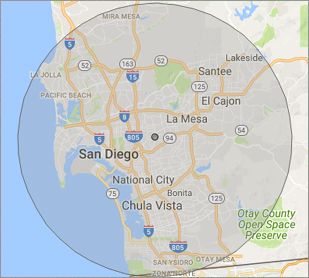
What is your Service Area for on-site Computer Repair?

We have serviced San Diego and the entire San Diego metro area for over a decade.

Our primary on-site mobile service areas include the greater San Diego metropolitan area, the Phoenix metro area, the Tucson metro area and the Las Vegas metro area.

We provide remote and mobile computer repair in San Diego, Chula Vista, Coronado, El Cajon, Imperial Beach, La Mesa, Lemon Grove,
National City and Santee.

Our on-site Computer Service Area

What should someone expect that hires you for Computer Service?

Our mission is to fully resolve your computer problems quickly and affordably. If you want a Computer Engineer that can fix all of your computer problems instead of a computer tech, a computer geek, a technician or a computer guy that can only fix some of your problems; call us at (619) 393-8620.  

What types of Computer Services do you perform?

We service businesses and business clients in their homes, including:
 
  • Diagnose / repair hardware or software problems
  • Spyware, malware, trojan and virus removal
  • Setup wireless and small business networks
  • Laptop repair, PC repair and Apple repair
  • Hard drive data recovery

San Diego Computer Repair Service Contact Information

San Diego Computer Repair Service
(619) 393-8620

San Diego Computer Repair Service is a Karls Technology company

* *
*
*
*
  *
* *


*
*
* * * * * * * * * * * * * * *
4.9 / 5 stars from 286 reviews

"Jason was the epitome of professionalism. He was so knowledgeable as well as thorough. I would use him anytime. I am extremely happy and thank you very much."

San Diego Computer Repair Service 5 / 5 stars

"The computer technician, Taylor, was patient, thorough and knowledgeable. He answered our concerns well and offered advice when asked. We were very happy with the results."

San Diego Computer Repair Service 5 / 5 stars

"Excellent help; friendly, personable, knowledgeable. Perfect!"

San Diego Computer Repair Service 5 / 5 stars

"Matt was excellent! Not only did he fix my printer issue, he took the time to educate me on several other helpful issues. Since I'm not a techie, he didn't talk down to me, rather, explained the issue in terms I could understand. I will definitely use again! Have a computer issue? These are the folks to call. "

San Diego Computer Repair Service 5 / 5 stars
Best Antivirus Software of 2026: The Ultimate Guide to Cybersecurity Brands

In 2026, the digital threat landscape has shifted. We are no longer just fighting simple viruses; we are defending against AI-generated phishing, sophisticated ransomware-as-a-service, and complex identity theft. Choosing the right antivirus brand is no longer optional—it is the foundation of your digital life. At Karls Technology, we’ve analyzed the top-performing security suites of the […] The post Best Antivirus Software of 2026: The Ultimate Guide to Cybersecurity Brands appeared first on Computer Repair Blog.

Windows OS Hibernation

A feature of the Windows operating system that can be found in both desktop computers and laptops is called hibernation. It is possible to program it to take place automatically if a battery alert goes out. Its primary function, with regard to desktop computers, is to act as an all-around method for conserving energy. Because […] The post Windows OS Hibernation appeared first on Computer Repair Blog.

Adding Shortcuts to Desktop Taskbar

Pinning a new shortcut to your Windows taskbar makes it instantly accessible from wherever on your computer. To see every app on your Windows device, press the Windows key, then click All programs. To pin an app to the taskbar, right-click it, select “More,” and then click “Pin to taskbar.” If the program is already […] The post Adding Shortcuts to Desktop Taskbar appeared first on Computer Repair Blog.

If Your Computer Has Been Hit with Ransomware

Do a fresh install of Windows if you’ve been infected with ransomware. Computers in the network should be disconnected. Turn them off until you’ve cleaned all the systems. Operating systems like Windows 10 and MacOS allow for speedy reformat and fresh installations. Antivirus software should be set up after an OS has been installed. A […] The post If Your Computer Has Been Hit with Ransomware appeared first on Computer Repair Blog.

Turn off Android Alerts to Help Battery

Faster smartphones are on the horizon, and with each software upgrade comes a slew of new functions designed to streamline your daily routine. Unfortunately, this technology may potentially shorten the lifespan of your device’s battery. If you have too many notifications set up on your Android, its battery life may suffer. To enable alerts on […] The post Turn off Android Alerts to Help Battery appeared first on Computer Repair Blog.

What is the Three Finger Salute from Microsoft?

The Three Finger Salute is terminology for the Ctrl+Alt+Del keyboard shortcut established by IBM PC co-creator and engineer David Bradley. It’s common practice to use the three keys whenever a PC fails to load Windows or gets stuck during the boot process. You can lock the computer, switch users, log out, open the task manager, […] The post What is the Three Finger Salute from Microsoft? appeared first on Computer Repair Blog.

Check if Website is Safe

You can inquire as to the security of a website using Google if you have doubts as to whether or not it is dangerous. According to famous tech company, Google’s unified approach to security, dubbed “Safe Browsing,” enables safer Internet experiences for users everywhere. To check to see if the website you’re wishing to visit […] The post Check if Website is Safe appeared first on Computer Repair Blog.

New Feature for AirTags

Apple is currently working on an additional feature on Find My to allow AirTags to “chirp”. This is a small, but important accessory to their product. According to sources from 9to5Mac, AirTag and a few other third-party devices allow you to “ping” an accessory with a sound. With this revision, the same function will be […] The post New Feature for AirTags appeared first on Computer Repair Blog.

Apple Event in October

Apple is reportedly getting set to have an event in October. This time around, Apple is putting its attention squarely on its newest hardware and software releases: iPadOS 16 and macOS Ventura. 9to5Mac reports that Apple is working on including the MagSafe connector into the iPad Pro 11 (with an LCD panel) and the iPad […] The post Apple Event in October appeared first on Computer Repair Blog.

What is System Restore?

System Restore is a useful Windows feature that allows you to restore any changes made to your computer’s settings to a previous save point. As a result, if a computer has system-related issues, the System Restore feature will use the restore point to revert to those settings from the current one. To use this feature, […] The post What is System Restore? appeared first on Computer Repair Blog.